


New article
Recently updated
What's Changing in Insights 26.2

Who is this article for?
Everyone who need the latest updates.
No permission required.
This article outlines the changes included in the Insights Version 26.2 upgrade, including navigation updates, Self Service Reports, scheduling improvements, and other enhancements.
Understanding the upgrade schedule and availability
The Insights Version 26.2 upgrade is scheduled within a four-hour maintenance window.
Note: Insights may be unavailable at times during the maintenance window.
Australia and New Zealand
- Australia: Tuesday 17 November 2026, 6:00 PM to 10:00 PM AEDT
- New Zealand: Tuesday 17 November 2026, 8:00 PM to midnight NZDT
United States
The maintenance window occurs on the evening of Monday 16 November in the United States:
- Mountain: 8:00 PM to midnight
- Pacific: 7:00 PM to 11:00 PM
- Central: 9:00 PM to 1:00 AM
- Eastern: 10:00 PM to 2:00 AM
Using the new look and navigation menu
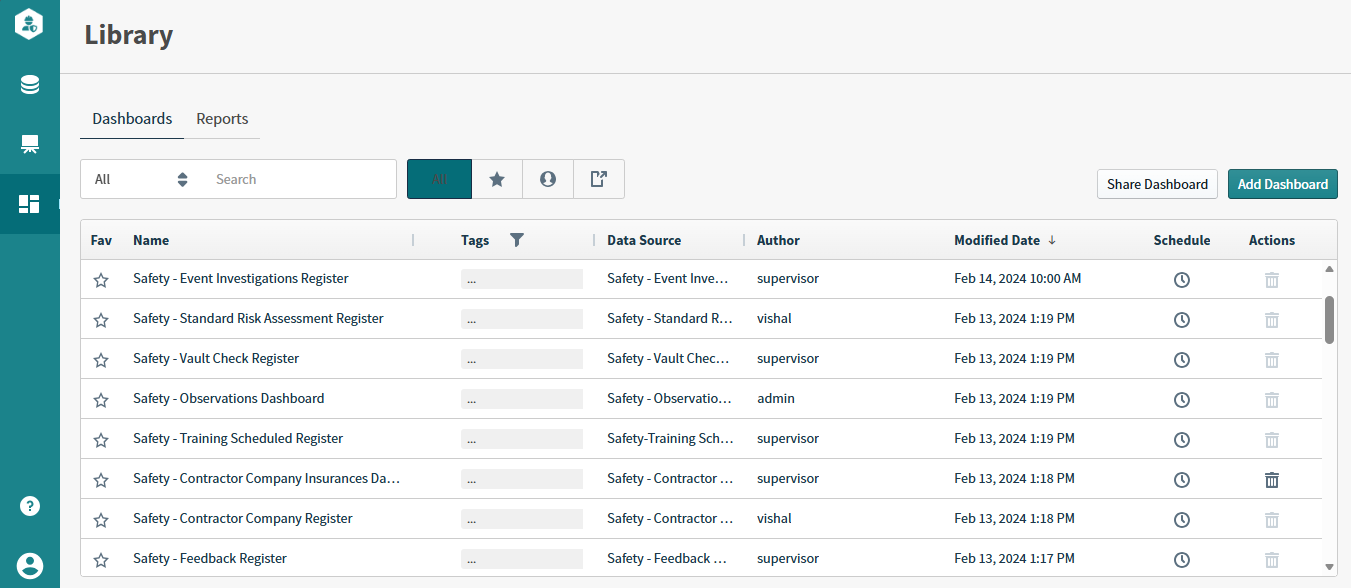
The traditional top navigation bar has been replaced with a navigation menu located on the left-hand side of the screen.
The new menu provides quick access to:
- Data Sources
- Visual Gallery
- Library
Help and Profile options are now located at the bottom of the menu. Your user profile, including the Log Out option, can be accessed through the Profile menu.
Navigating the Library tabs
The Library has been reorganised to make content easier to locate.
- Dashboards are now stored under the Dashboards tab
- Self-service reports are now stored under the new Reports tab
This separation helps distinguish dashboard content from formatted reporting content.
Creating Self Service Reports
Insights Version 26.2 introduces Self Service Reports.
You can now:
- Create formatted, table-style reports
- Add custom headers and footers
- Select page sizes
- Export reports to PDF
- Schedule reports for delivery
Tip: Use dashboards to explore data interactively and reports when you need a formatted document for distribution.
Sharing reports
Reports can now be shared with individuals or groups within your organisation.
To share a report:
- Go to the Reports tab.
- Select Share Report to grant access to report recipients.
Using Drill Down
The Zoom option has been renamed to Drill Down.
This is a naming change only. Functionality remains the same and allows you to navigate into more detailed levels of data.
Resizing columns
Columns can now be resized in both:
- Library
- Visual Gallery
This provides greater flexibility when viewing long names or larger datasets.
Configuring timezone support for scheduled reports
Scheduled reports now include timezone settings.
This ensures reports continue to be delivered at the same local time, even when daylight-saving changes occur.
Example: A report scheduled for 7:00 AM will continue to be delivered at 7:00 AM after daylight saving adjustments.
Understanding additional enhancements
Other improvements included in this release are:
- Ratio number formatting
- New line trend display styles
- Custom data label colours for combo charts
- Improved accuracy when working with very large numbers
For a complete list of changes, refer to the Insights Version 26.2 Release Notes.
Understanding what is not changing
The following items remain unchanged after the upgrade:
- Existing dashboards
- Visuals and filters
- Scheduled reports
- Data sources and underlying data
- User access permissions
No action is required prior to the upgrade. The update will be applied automatically for all customers.
Getting help
For guidance on the new user interface and navigation, refer to:
- Understanding Insights Features and Navigation in IWS
- Insights Version 26.2 Release Notes
If you require additional assistance or have questions regarding the upgrade, create a ticket through the Ideagen Help Centre.