


New article
Recently updated
Using site assistant to get instant answers

Who is this article for?
Administrator who want to use a form, memo, or action template in the Registers.
Administrator permission are required.
Site Assistant enables you to get instant answers to your questions by typing or speaking in a conversational way, helping you gain insights from the data captured in Ideagen Workforce Safety Forms.
Setting up metrics before using the site assistant
Before using Site Assistant, set up Metrics for things that are important to you, such as times, costs, materials and progress. This only takes a few minutes.
Once configured, you can ask questions like:
- How many Weekly Timesheets this week?
- How many Open Corrective Actions?
- How many loads of rubble by Jim Morrison last week?
- How many P1 safety incidents at Zone D this year?
Note: We recommend getting familiar with Metrics to really enable your organisation to make the best use of Site Assistant.
Accessing the site assistant
Site Assistant is available to Super users only. You can find it on the right-hand side of your screen if you are on the web, and at the bottom of your screen in the mobile app, so you can get answers on site and in the office.
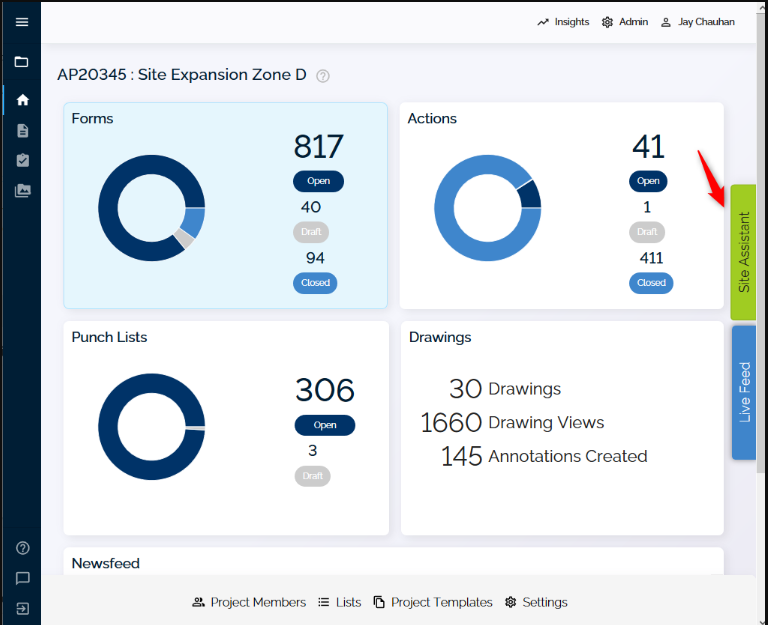
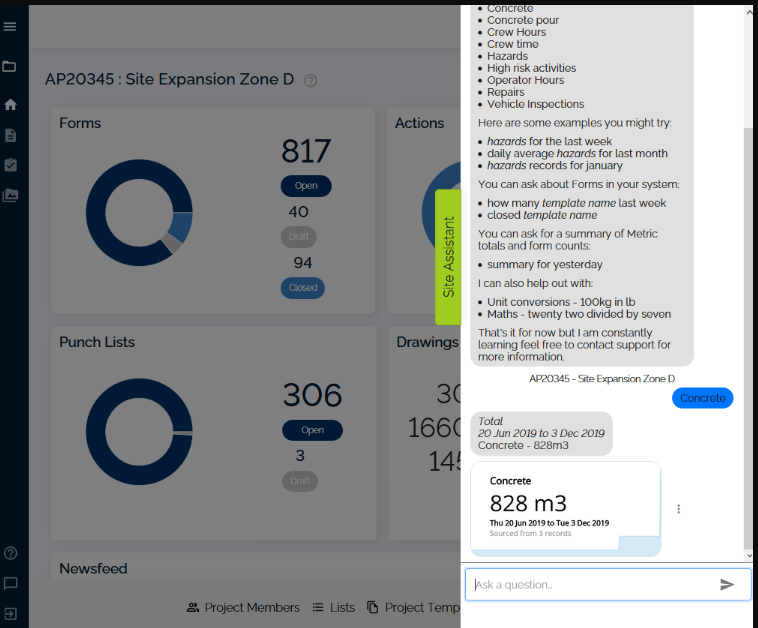
If you do not see it, please contact us to talk about getting access and answers to your questions about the wealth of data in your organisation's Forms and Actions.
Note: If you are in a project, Site Assistant only looks at data in that project. If you want it to report on all projects, you need to clear the project in the project selection list first.
Using additional site assistant features
You can also use Site Assistant to:
- Ask Site Assistant for Help to get more tips on how to make it work for you
- Do unit conversions on the spot (for example, "15 tonnes in kilograms")
- Do maths (for example, "twenty two divided by seven")
- Ask for a Summary of records created and Metrics for a specified time period (for example, "Summary for yesterday", "Summary for this year" or "summary for July 16 2019")
- Narrow down results by attributes like name (for example, "by John?" or "for companyA?")
- List and Export results (for example, "List them")