


New article
Recently updated
Understanding the drug & alcohol schedule overview in EPP

📝 Summary
This article explains how users with custom permissions can access and manage the Drug & Alcohol (D&A) Schedule in EPP. The schedule helps track individuals selected for testing and manage testing sessions across selected worksites.
Details
What it is:
The Drug & Alcohol Schedule is a management tool that allows authorized users to view, create, and maintain testing schedules for employees. It supports compliance with workplace safety policies and ensures proper documentation of testing activities.
Why it matters:
Managing D&A testing schedules helps organizations maintain a safe work environment, meet regulatory requirements, and ensure transparency in testing procedures.
💡Key points:
- Access the schedule via Worksite → Drug & Alcohol Schedule in the left-hand navigation
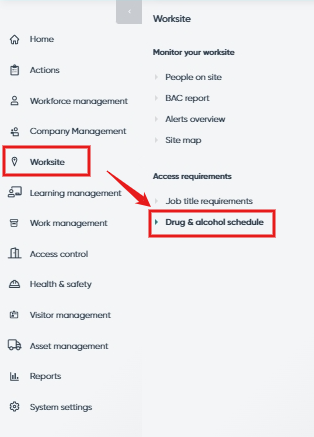
- Available only to users with custom permission.
- Users can:
- View a list of individuals selected for D&A testing
- Create new testing schedules
- View and manage existing schedules
- Edit, delete, and review schedule history
Disclaimer:
Access to features and information described in this article may vary depending on the user's role and custom permissions. Users with different access levels may see different options or have limited functionality within the page.
📝 FAQs
What is the “Test to Complete” section?
This section displays all individuals currently selected for D&A testing.
[Learn more → Test to Complete]How do I create a new testing schedule?
Use the “Create Testing Schedules” section to set up a new D&A testing session.
[Learn more → Create Testing Schedules]Can I edit or delete existing schedules?
Yes, you can manage all existing schedules, including editing details, deleting entries, and viewing schedule history.
[Learn more → Testing Schedules]